Audit, fix, and roll back internal links on a WordPress site with Claude — without leaving the chat.
“Claude, find me every redirected internal link on willdoseo.com.”
That prompt scans the site, renders each page (so theme blogrolls and paginated archives count as inbound), and returns a report with every internal link classified. I click Fix on the ones I want resolved — a rollback file is written before any change. The whole loop runs inside one Cowork chat.
The plugin is wp-internal-links. A small MCP server that runs locally on your Mac. No SaaS, no cloud, no data leaving your machine.
The pain
SEO consultants do this audit by opening every post in wp-admin and hovering every link. Yoast and Rank Math surface a sliver. Screaming Frog gives you the graph but not the fix loop. Mostly it ends up in a spreadsheet that’s wrong by the time you finish.
So I wired Claude into the WordPress REST API and let it do the labor — find the issues, prioritize, draft the change, write the rollback before any post is touched.
What it catches
- Orphan posts (no inbound anywhere)
- Body-only orphans (theme-reachable, no editorial inbound)
- Under-linked posts (sparse body)
- Redirect chains (auto-fixable)
- Broken (404) internal links
- Weak / duplicate anchor text
How you use it
Ask Claude to audit your site. The audit renders as a branded interactive dashboard inline in chat — KPI strip across the top, tabbed issue lists, action buttons on every row. Click Fix on a redirect → the prompt routes back to chat, you confirm, the change is applied. Click Suggest sources on an orphan → TF-IDF returns five candidate posts that should link to it.
Setup, two minutes
- Install Cowork.
- In WordPress: create a dedicated Editor-role user, generate an Application Password under their profile (you can revoke your application password anytime).
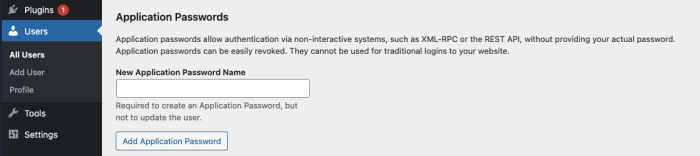
- Drag the
.pluginfile into Cowork. - Ask Claude: “Add my WordPress site — URL, username, App Password”. The password lives in your macOS Keychain.
Works with Classic, Gutenberg, Elementor, Divi, and Beaver. Other builders flag for manual review.
Safety
Read-only by default. Every fix requires explicit confirmation. Rollback file written before any write. App Password lives in Keychain.
Install
wp-internal-links-mcp.plugin — drag into Cowork → Settings → Plugins.
If you want help wiring AI into your marketing workflows
Internal linking is one use case. Claude + a domain-specific local MCP — fits most agency labor: content audits, schema generation, programmatic landing-page review, rank tracking. If that’s on your plate, reach out.
WillDoSEO.com
Powered By Espresso ☕️