
If you’re running the same Screaming Frog audit week after week — clicking the same UI toggles, picking the same exports, manually comparing this crawl to last week’s — I have something for you.
I built a Cowork skill that lets Claude drive Screaming Frog from the command line on macOS. You tell Claude “crawl willdoseo.com and compare it to last week’s run” and about 90 seconds later you’ve got a diff of every URL that changed status code, title, canonical, or indexability. No manual clicking. No remembering which exports you wanted. No forgetting to save the crawl file for later.
What it actually is
A “skill” in Cowork is a bundle of instructions and helper scripts that Claude uses for a specific job. You drop the .skill file into Claude’s sidebar and from that point on, whenever you mention Screaming Frog in a conversation, Claude knows how to build the right CLI command for your exact audit, save it as a double-clickable .command file, let you kick it off, and pull the results back for analysis.
No API keys. No config files. No editing launchd plists by hand. You paste the skill in once and then you just talk to Claude.
The four modes it handles
- Full site crawl — “Crawl example.com and give me all the standard exports.”
- Targeted exports — “Just pull broken links and redirect chains from the last crawl.”
- Compare two crawls — “What changed on example.com since last Monday?” Claude diffs the two runs and gives you a readable summary plus a row-per-URL-per-change CSV.
- Scheduled / recurring crawls — “Run this every Monday at 6am.” Handled through a companion scheduling skill that’s already part of Cowork.
What you need
- macOS
- A licensed copy of Screaming Frog SEO Spider. The free version caps at 500 URLs and blocks
--save-crawl, saved configurations, and scheduling — which is most of what makes the CLI useful. - The Claude desktop app with Cowork mode.
Install (about 30 seconds)
- Download the
.skillfile from the link at the bottom of this post. - Open Claude, switch to Cowork mode.
- Go to “customize” then “create new skill”, click the plus sign, create skill, then upload skill.
- Click “Save skill.” Done.
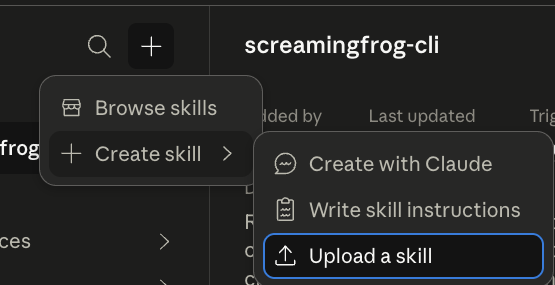
The skill installs itself into Claude’s skills folder. Next time you say “Screaming Frog” in a conversation, Claude picks it up automatically.
Example 1: your first crawl
You type:
Crawl willdoseo.com and give me the standard audit exports.
Claude:
- Asks for access to your
~/ScreamingFrog/folder (one-time, so it can read results back later). - Generates a
.commandfile with the exact SF CLI command baked in. - Hands you a clickable link.
You double-click the .command. Terminal opens, Screaming Frog runs headless for 1–3 minutes, and exports land in ~/ScreamingFrog/crawls/willdoseo-com-<timestamp>/.
The non-obvious win here: you don’t have to remember whether it’s --export-tabs "Response Codes:4xx" or --export-tabs "Response Codes:Client Error (4xx)". Claude knows. If you get the export name wrong, SF produces no error and no export — the crawl just finishes silently with a missing file. That’s the single most annoying SF-CLI failure mode, and the skill eliminates it.
Example 2: the weekly compare (this is the one)
You type:
Compare this week’s willdoseo.com crawl to last week’s.
Claude finds the two most recent crawl folders, runs the diff script in the background, and hands back a summary like this:
# Crawl comparison: willdoseo.com
Old: 2026-04-14 (203 URLs)
New: 2026-04-21 (207 URLs)

## URL inventory
- Added:   4
- Removed: 0
- Common:  203

## Status code changes
- 200 → 404   /blog/old-post-slug
- 200 → 301   /services/legacy-page

## Title changes
- /services/seo
  - old: SEO Services - Example
  - new: SEO Services | Example

## Indexability changes
- /staging/new-landing  now noindex
This is the feature that made me build the skill in the first place. Screaming Frog has an in-app “Compare” mode, but it’s GUI-only — you can’t script it. The skill’s comparison runs in Python against the exported CSVs and gives you the delta in under 10 seconds. You also get a changes.csv for digging further.
Example 3: scheduling
You type:
Run this crawl every Monday at 6am.
Claude registers a one-time or recurring scheduled task. Monday at 6am your Mac runs the crawl unattended. Exports land in a timestamped folder under ~/ScreamingFrog/scheduled/<job-name>/. Next time you open Claude and ask for a diff, the whole history is right there.
If you already use Screaming Frog’s native File > Scheduling feature, the skill knows not to create a conflicting second schedule — it’ll ask which one you want.
Under the hood (for the curious)
The skill is just a zip file with three pieces:
SKILL.md— the instructions Claude follows.references/— reference docs Claude consults on demand (every valid export name, every CLI flag, every platform gotcha).scripts/— Python helpers: command builder, crawl summarizer, two-crawl diff, help-text dumper.
If you want to see what Claude is doing or tweak the behavior, you can unzip the .skill file, edit whatever you want, zip it back up, and re-install. Fully open.
Grab the skill
macOS only. Drop it into Cowork, then ask Claude to crawl something. You’re off.
One favor
If you try it and hit anything weird — a flag I missed, an export name that’s changed, a workflow you want automated — reply on LinkedIn or email me.
Happy crawling, see you in the SERPS!
WillDoSEO.com
Powered By Espresso ☕️

Disclaimer: I’m not affiliated with, sponsored by, or endorsed by Anthropic (the makers of Claude), Screaming Frog, or any other company mentioned in this post. I’m just an SEO who built something useful and wanted to share it. All product names and trademarks belong to their respective owners.